Smart Date Recommender
Last updated: February 23, 2026
What is Smart Date Recommendation?
Determining the start date for headcount is an area of uncertainty that impacts multiple teams across recruiting, HR and finance. This uncertainty is particularly challenging at the time of headcount creation, often resulting in inaccurate dates that require subsequent changes. These inaccuracies can result in inflated budgets, especially when target dates are pushed back multiple times compared to the original date (i.e., budget date).
To address this challenge, TeamOhana now automatically recommends target dates for hiring headcount based on your organization's historical hiring trends for similar roles. The system provides recommendations for three key dates:
Target Start Date: The expected date when the employee will begin working at the organization
Target Hire Date: The date by which the employee needs to be hired (offer accepted) to meet the target start date
Target Open Date: The date by which the role needs to be opened in your ATS to start hiring
How Recommendations Work
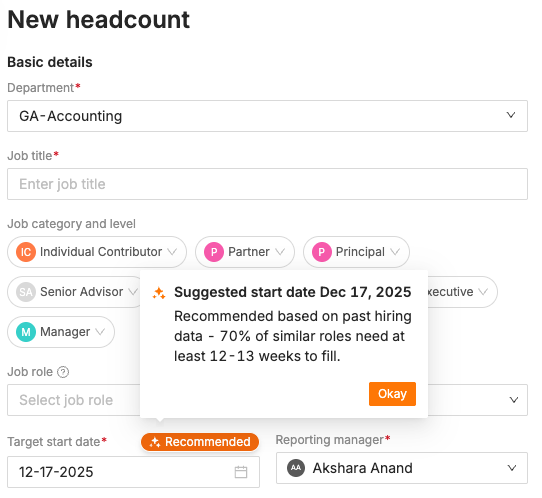
The system pre-populates recommended hire and start dates based on your historical hiring data for roles. It matches (1) location, (2) level, and (3) department characteristics.
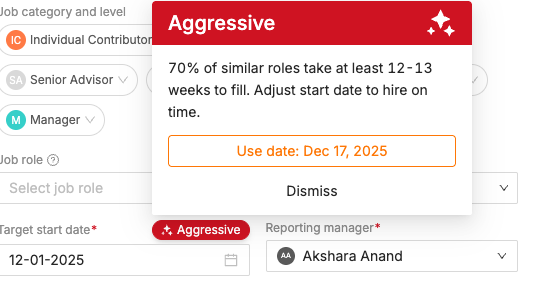
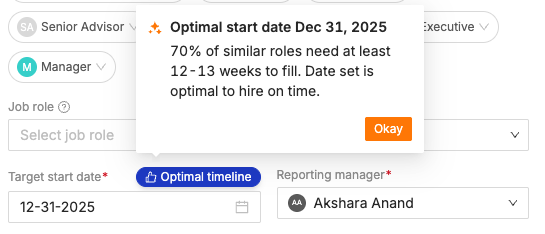
You can always override our recommendation by editing the field, either during headcount creation or afterward. When you edit dates, the system provides helpful indicators:
"Aggressive" appears when your date is earlier than our recommendation
"Optimal Timeline" appears when your date is later than our recommendation
Frequently Ask Questions
Q: How is the Recommended Date calculated?
The system uses the 70th percentile of historical hiring timelines for roles matching department, job level, and location.
Each date is defined as follows:
Target Open Date = expected date for the role to be opened for hiring
Target Hire Date = expected time to hire once if the role is opened on the Target Open Date
Target Start Date = expected time to hire once if the role is opened on the Target Open Date and hired by the Target Hire Date
If no historical data exists, the default values are as follows:
Target Open Date = 30 days from the current date
Target Hire Date = 60 days from the current date (time to hire)
Target Start Date = 90 days from the current date (time to fill)
Q: Why is my date flagged as "Aggressive" or "Past Due"?
If you set the Target Date earlier than the recommended date, it's flagged as "Aggressive." If the Target Date is earlier than today, it's flagged as "Past Due." You can use the one-click Recommended Date feature to reset it.
Example: If the recommended date is October 15 and you set October 5 → Aggressive. If you set September 10 → Past Due.
Q: What happens if I edit Target Hire Date or Target Open Date directly?
These dates can be edited independently without overriding the Target Start Date. However, when you change the Target Start Date, the system will automatically recalculate and reset both Target Hire Date and Target Open Date.
Q: Do scenarios behave differently?
No. Smart Date Recommendation functions consistently across Scenarios, Hiring Plans, and Headcount details.
Q: What if my organization is new or lacks historical data?
We apply standard industry defaults until your hiring history develops:
30 days between offer acceptance and start date
60 days average time-to-hire
90 days average time-to-fill
Q: Do recommendations work differently for headcounts already in progress?
Yes. When an actual Open Date exists and differs from the Target Open Date (either delayed or earlier), the system adjusts the Target Start Date recommendation accordingly.
Q: What happens when I bulk apply Smart Dates?
All selected headcounts will have their Target Start Date, Target Hire Date, and Target Open Date updated to recommended values simultaneously.
Q: Will applying Smart Dates overwrite my manually set dates?
Yes. Applying Smart Dates replaces existing values with recommended ones, though you can re-edit them afterward.
Q: Are all dates editable?
Yes. Target Start Date, Target Hire Date, and Target Open Date remain fully editable by users at all times.
Q: Can we as an organization opt out?
Yes. Smart Date Recommendation can be disabled at the account level. Previously filled dates will remain but can be manually cleared if desired.